

You know that feeling when you check your bank statement and see a charge from services you forgot existed?
Netflix, Hulu, Disney+, HBO Max…. the list of streaming services you signed up for a free trial, maybe or just to binge-watch one season, but now you’ve lost track and keep getting charged.
According to a study in 2024, the average American subscribes to 4.7 streaming services and spends about $91 per month on subscriptions.
Why It’s So Hard to Track Streaming Subscriptions
Before we get into HOW, let’s talk about WHY this problem exists in the first place.
Streaming companies make subscriptions easy to start and deliberately difficult to track. Free trials automatically convert to paid subscriptions. Annual payments hit your credit card once, and you forget about them until another payment hits you.
Some services bill through third-party platforms like Roku, Apple, or Amazon Prime Video Channels, so the charge doesn’t even show the actual service name.
Plus, you probably signed up using different email addresses over the years. That work email you used for your Spotify trial? That personal Gmail you set up your original Netflix account with? The streaming services are scattered across multiple accounts, making them nearly impossible to track manually.
And let’s be honest here, streaming services aren’t incentivized to remind you that you’re paying for something you don’t use. That’s revenue for them, and your forgotten subscription is their quarterly earnings call talking point.
So, now that we’ve understood the why, let’s get right into the how because it’s about time we get rid of those unwanted subscriptions.
Method 1: Check Your Bank and Credit Card Statements
Start with the obvious: your bank statements. This is where every subscription charge eventually shows up, whether you remember signing up or not.
Here’s what to do:
- Log in to each bank account and credit card you use
- Download statements for the past 3-6 months
- Search for common streaming service names: Netflix, Hulu, Disney, HBO, Amazon, Apple, Spotify, YouTube.
- Look for recurring charges that happen monthly or annually
- Pay attention to charges from Apple.com, Amazon Prime, and Roku, which might be bundling multiple streaming services
The problem with this method? It’s time-consuming. If you have multiple cards and accounts, you’re looking at hours of work. Plus, streaming services sometimes show up under parent company names or payment processor names that aren’t immediately recognizable.
A more efficient and accurate way to track and find unwanted subscriptions is to use a subscription management tool like Chargeback (more on this later - Method 4)
Method 2: Search Your Email Inbox
Every streaming service sends confirmation emails when you sign up, receipt emails when you’re charged, and renewal reminders (sometimes)
Try these search terms:
- "subscription"
- "receipt"
- "billing"
- "payment confirmed"
- "trial ending"
- "renewal"
Go back at least 12 months because some services charge annually. If you only check the last month or two, you'll miss those yearly subscriptions that quietly renewed six months ago.
The catch? You need to do this for every email address you've used over the years. That old college email where you signed up for Spotify Premium? That work email you used during the pandemic when you got the Peacock free trial? Yeah, those too.
This method works, but it's tedious. And if you're like most people, you've got thousands of unread emails, making this search feel like finding a needle in a digital haystack.
Method 3: Review Your PayPal and Venmo Transactions
Digital platforms like PayPal and Venmo are commonly used for subscriptions, especially for smaller streaming services and niche platforms.
For PayPal:
- Log in to PayPal.com
- Go to Settings > Payments > Manage automatic payments
- Review the list of merchants with recurring billing authorization
For Venmo:
- Open the Venmo app
- Go to Settings > Connected Businesses
- Check for any active subscriptions
Some streaming services, particularly international ones or smaller platforms like Crunchyroll, Shudder, or Mubi, frequently use PayPal as a payment option. If you’ve been subscribing to niche content, there’s a good chance it’s being billed through PayPal.
Method 4: Let AI Find Your Subscriptions Automatically
Here’s the reality: all the manual methods above work, but they are time-consuming, error-prone, and frankly exhausting. It’s also one of the reasons why many consumers keep getting charged, because they simply give up.
This is why subscription management tools exist. Services like Chargeback use AI agents to automatically scan your email inbox and bank account to find every recurring charge, including streaming subscriptions you’ve forgotten about.
How it works:
- Connect your email and financial accounts securely
- AI automatically identifies all recurring payments and free trials
- Everything appears in one dashboard, so you can see exactly what you’re paying for
- AI agents can cancel unwanted subscriptions for you automatically
- Get reminders 24 hours before free trails conver to paid subscriptions
The advantage here is obvious: you don’t have to do the work, the AI does it for YOU.
Additionally, if you’re trying to figure out what subscription management app would be best for you, check out this guide - (https://www.joinchargeback.com/blogs/best-10-apps-to-manage-cancel-subscriptions)
Chargeback in particular has helped customers save over $30 million on unwanted subscriptions, covering more than 15,000 different subscription services.
Find All Your Subscriptions in One Place
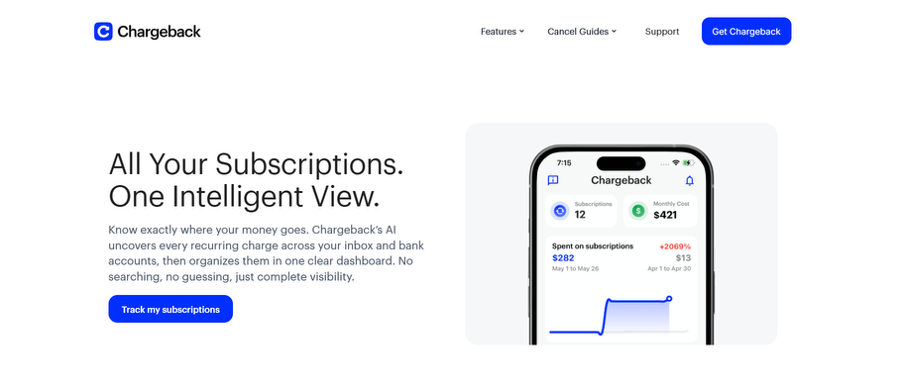
If you’re tired of playing detective with your own finances, this is the solution that actually makes sense. One connection, and you’re done. The AI handles the rest.
Try Chargeback now, find unwanted subscriptions, take charge, and stop wasting money on subscriptions you don’t use or never knew existed!
FAQs about Finding Streaming Subscriptions
How do I find subscriptions I forgot about?
Check your bank statements for recurring charges, search your email for terms like “subscription” and “receipt”. The fasted method is using a subscription tracking tool like Chargeback, which automatically scans your accounts and identifies all recurring payments for you.
Can I see all my subscriptions in one place?
Yes, but not through any single streaming service. You’ll need to either manually compile them from different sources or use an automated tool like Chargeback that aggregates all your subscriptions in one unified dashboard.
What if I can’t remember which email I used for a subscription?
Check all your email accounts using search terms like the service na,e “subscription”, and “billing”. If you still can’t find it, look at your bank statement to see which company is charging you, then contact their customer support with your payment information to locate your account.
How often should I audit my streaming subscription?
At minimum, review your subscription every 3-6 months. Set a recurring calendar reminder to check your streaming services and cancel anything you’re not actively using. Or use Chargeback’s automatic monitoring to track your subscriptions continuously without manual effort.
Get help with your refund
"This app saved me
$127 in minutes"


.svg)
.png)


